> For the complete documentation index, see [llms.txt](https://spsvn.gitbook.io/product-docs-1/llms.txt). Markdown versions of documentation pages are available by appending `.md` to page URLs; this page is available as [Markdown](https://spsvn.gitbook.io/product-docs-1/huong-dan-cai-dat-va-cau-hinh-quan-tri-vien/cau-hinh-he-thong/thiet-lap-chuc-danh-job-title.md).

# Thiết lập Chức danh - Job Title

**Cách 1: Nhập thông tin trực tiếp trên phần mềm:**&#x20;

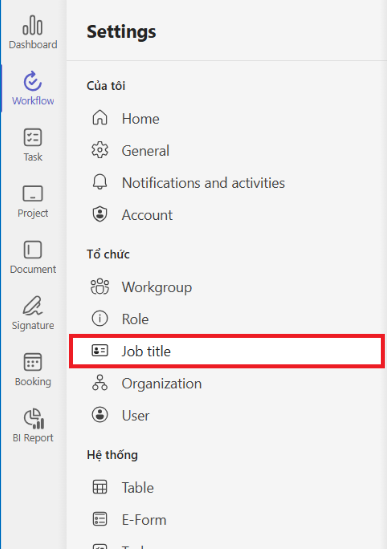
1. Từ menu Setting, chọn Job Title:&#x20;

<figure><img src="https://2462019127-files.gitbook.io/~/files/v0/b/gitbook-x-prod.appspot.com/o/spaces%2F71lCQurVmuzyJhE2SjGT%2Fuploads%2F5N4W8ddcBqz8BsESVDQF%2Fimage.png?alt=media&amp;token=f26316dc-ba47-4b0d-b3f0-2561e7254ee0" alt=""><figcaption></figcaption></figure>

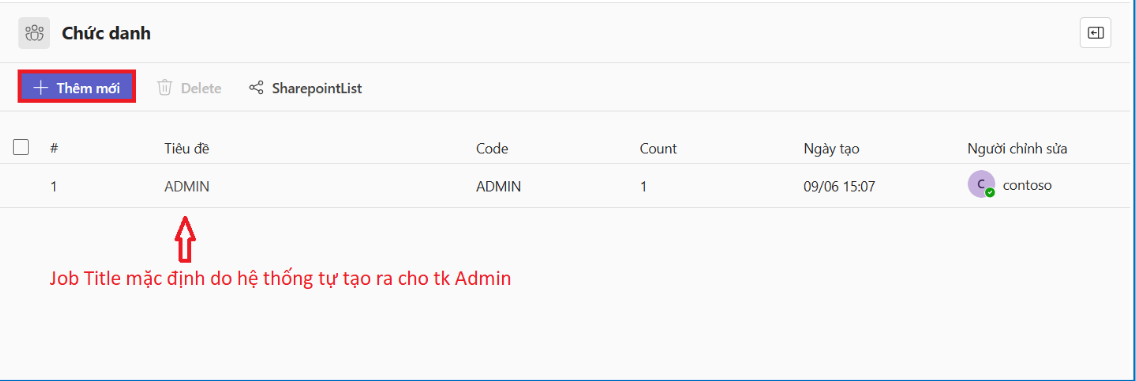
2. Chọn **+ Thêm mới** để thêm mới 1 JobTitle

<figure><img src="https://2462019127-files.gitbook.io/~/files/v0/b/gitbook-x-prod.appspot.com/o/spaces%2F71lCQurVmuzyJhE2SjGT%2Fuploads%2F9tmKznGNYVDE2wh5ODiK%2Fimage.png?alt=media&amp;token=e0804cc5-8175-44b5-ad32-8ca8b0986ae5" alt=""><figcaption></figcaption></figure>

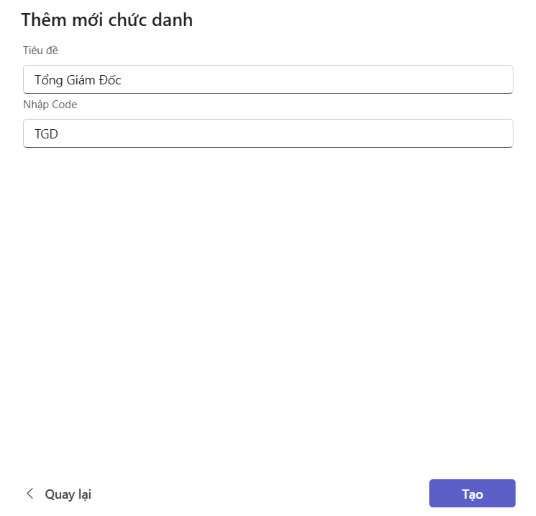
3. Nhập các thông tin&#x20;

   1. Tiêu đề: Tên đầy đủ của Chức danh&#x20;
   2. Code: Mã chức danh (viết liền không dấu) – <mark style="color:red;">Lưu ý mã chức danh là giá trị duy nhất</mark>&#x20;

   <figure><img src="https://2462019127-files.gitbook.io/~/files/v0/b/gitbook-x-prod.appspot.com/o/spaces%2F71lCQurVmuzyJhE2SjGT%2Fuploads%2FYXvpmDcSHotlaO4fbVnZ%2Fimage.png?alt=media&amp;token=63448920-8601-4015-9753-bb9cf4630518" alt=""><figcaption></figcaption></figure>
4. Chọn \<Tạo> để thêm mới 1 chức danh&#x20;

**Cách 2: Nhập các thông tin trên SharePoint list:**&#x20;

1. Từ menu Setting, chọn Job Title
2. Chọn SharePoint List

<figure><img src="https://2462019127-files.gitbook.io/~/files/v0/b/gitbook-x-prod.appspot.com/o/spaces%2F71lCQurVmuzyJhE2SjGT%2Fuploads%2FF0csyldBWqmgFuUDGorp%2Fimage.png?alt=media&amp;token=033d880a-7092-4636-98bd-a9a3a7aba235" alt=""><figcaption></figcaption></figure>

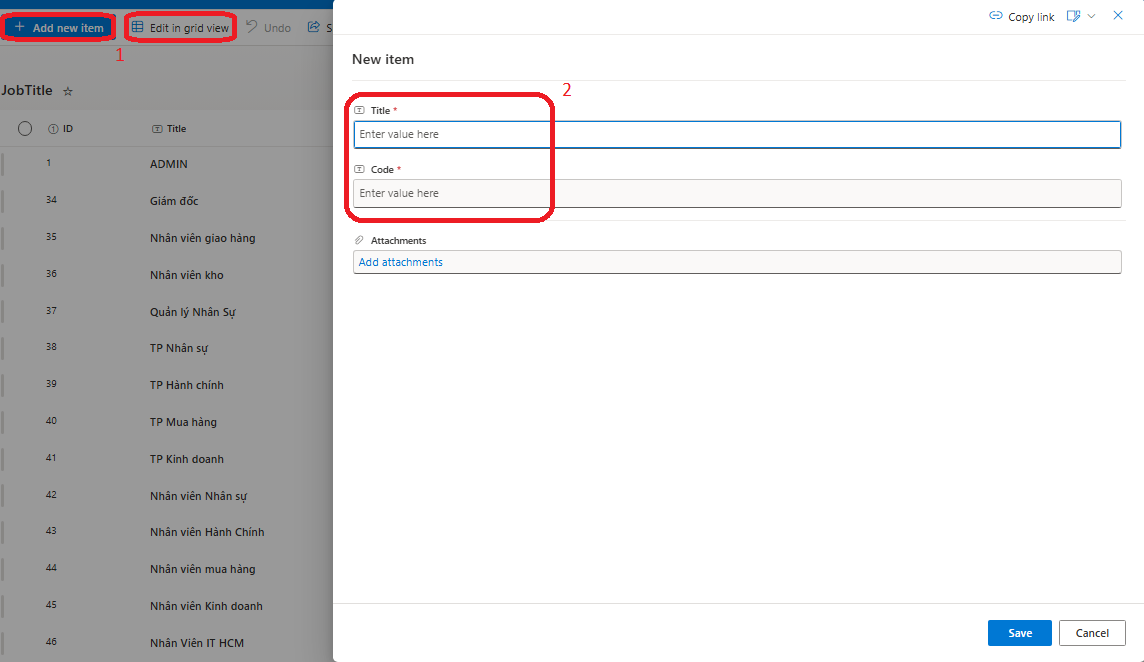
3. Từ màn hình của list Job Title, chọn + Mới để thêm từng chức danh hoặc Chỉnh sửa ở dạng xem lưới để thêm nhiều chức danh một lúc&#x20;

<figure><img src="https://2462019127-files.gitbook.io/~/files/v0/b/gitbook-x-prod.appspot.com/o/spaces%2F71lCQurVmuzyJhE2SjGT%2Fuploads%2FsaqjyKUyHlBkUInXrUah%2Fimage.png?alt=media&amp;token=ccd21f0f-49bd-406f-8524-bb96f6ab140a" alt=""><figcaption></figcaption></figure>

4. Nhập các thông tin tương tự như khi thêm mới trên phần mềm.&#x20;
5. Nếu các thông tin mới nhập không hiện ra trong danh sách, Chọn Admin.  Danh sách các Job Title sẽ hiển thị trong list.&#x20;

<figure><img src="https://2462019127-files.gitbook.io/~/files/v0/b/gitbook-x-prod.appspot.com/o/spaces%2F71lCQurVmuzyJhE2SjGT%2Fuploads%2Fui1Etkuj0mMHJMm1IemY%2Fimage.png?alt=media&amp;token=eadc912d-fdc5-4789-99fd-7c8a288ab82e" alt=""><figcaption></figcaption></figure>