> For the complete documentation index, see [llms.txt](https://spsvn.gitbook.io/product-docs-1/llms.txt). Markdown versions of documentation pages are available by appending `.md` to page URLs; this page is available as [Markdown](https://spsvn.gitbook.io/product-docs-1/huong-dan-cai-dat-va-cau-hinh-quan-tri-vien/cau-hinh-van-ban/cau-hinh-loai-van-ban/cau-hinh-bang-trong-bieu-mau.md).
# Cấu hình bảng trong biểu mẫu
Sử dụng trong trường hợp biểu mẫu có bảng nhập liệu, cần cấu hình lần lượt: Bảng; Đưa Bảng vào Loại Văn Bản; Cấu hình Bảng trong Biểu mẫu
**Bước 1**: Tạo Bảng và thêm các Cột dữ liệu
***Lưu ý***: Không tạo trước cột Số thứ tự (STT).
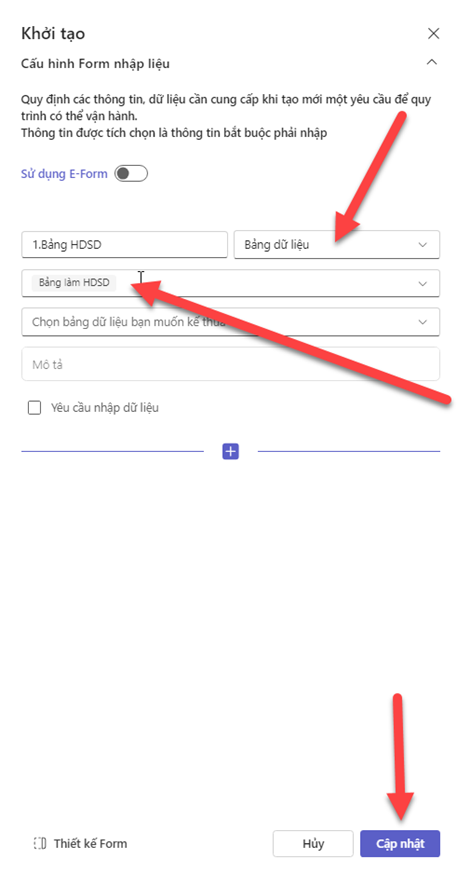
**Bước 2**: Đưa bảng vào Loại Văn Bản
**Bước 3**: Tạo bảng tương ứng trong biểu mẫu
**Bước 4**: Gán metadata vào ô tương ứng
***Lưu ý***:
\
1.Ô Số thứ tự cần gán metadata “Bắt đầu lặp” trước khi gán “Số thứ tự”
\
2.Ô cuối cùng trong bảng sau khi gán metadata của dữ liệu cần gán thêm “Kết thúc lặp”
**Bước 5**: Kiểm tra kết quả. Khi tạo Yêu cầu đã hiển thị Bảng để nhập dữ liệu
Sau khi tạo yêu cầu, chọn In văn bản để đối chiếu thông tin đã nhập và thông tin hiển thị trên biểu mẫu